Groups and partylines
A group is one show or event, and its partylines are the lines people talk and listen on inside it. Each group is one room: make your groups, then add and name their lines.
- Takes about
- 4 minutes
- You need
- Your server open in Admin (how to open it)
In Admin, go to Groups. Type a name such as Padel or Studio A, and press Add group.
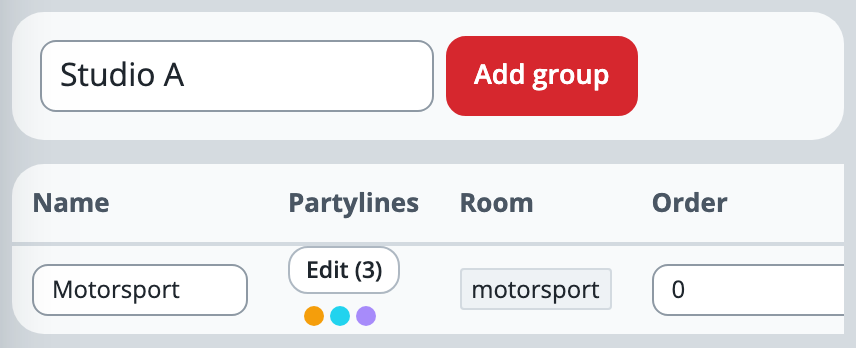
A new group starts with two partylines, Production and Commentary. Press Edit in its row to see them.
To add a line, type its name, such as Spotters, and press Add partyline. It gets a label and a colour of its own, which you can change.
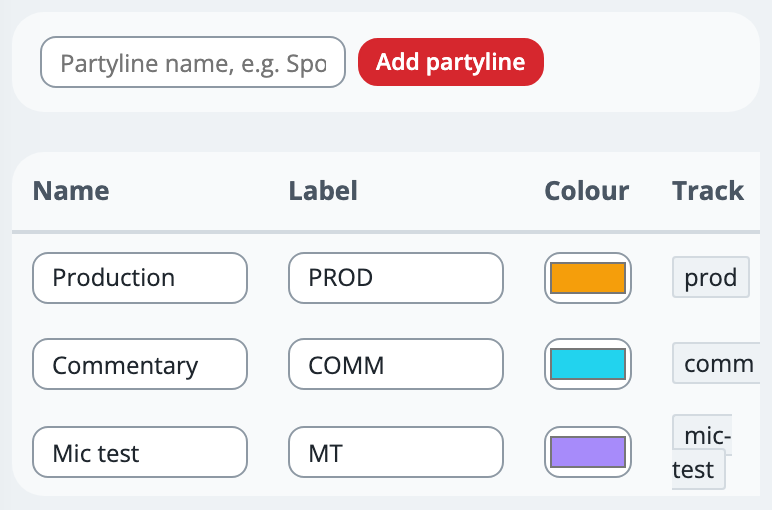
To change a line, type over its Name or Label and press Enter, or pick a new Colour. The label, up to 6 characters, is what its key shows, as in TALK PROD, and each change is saved as you make it.
Use Order, further along the table (scroll sideways on a phone), to put the lines in the order you want: the lowest number comes first. Everyone sees the keys in that order unless they arrange their own, in Settings under Keys with Arrange banks….
The Track column is the line’s short name inside the system, such as prod. It stays the same when you rename the line, and Companion uses it (Stream Deck and Companion).
To remove a line, press Delete at the end of its row and confirm. Its key disappears from everyone’s panel, even for people already on air.
Next, choose who is on each line: Who can talk or listen. Crew are not on a new line until you do.
If it doesn’t work
Add group says “This site’s licence covers 2 groups”
That is your trial’s limit. Delete a group you do not need, with Delete at the end of its row, or write to support@oncommstalkback.com for more. Deleting a group also deletes its lines, who is on them and its tally switchers, and takes anyone in it off air.
It says “slug already exists” or “slug already used in this group”
Something already has that name, or a name that makes the same short name. Choose a different one. A line also cannot be called direct, which is kept for private calls.
A group says “No partylines yet — nobody can join this group until you add one”
Add at least one partyline to it, then give people a place on it.
A person cannot see the group
They are not on any of its lines yet. Give them one in Who can talk or listen.
Stuck on a step?
Write to support@oncommstalkback.com with the page you are on and what your screen says. Or book a walkthrough, and we will go through it with you.