Disable or remove a user
Stop someone signing in, either for a while or for good. Disabling keeps their lines and settings, and deleting removes them.
- Takes about
- 2 minutes
- You need
- Your server open in Admin (how to open it)
In Admin, go to Users and find the person. Their row ends with Password, Disable and Delete buttons: on a phone, scroll the list sideways to reach them.
To stop someone for a while, press Disable. They are taken off air straight away, and cannot sign in until you press Enable.
A disabled person’s row is greyed out and marked disabled. Their lines and settings are kept, and they no longer appear in Assignments.
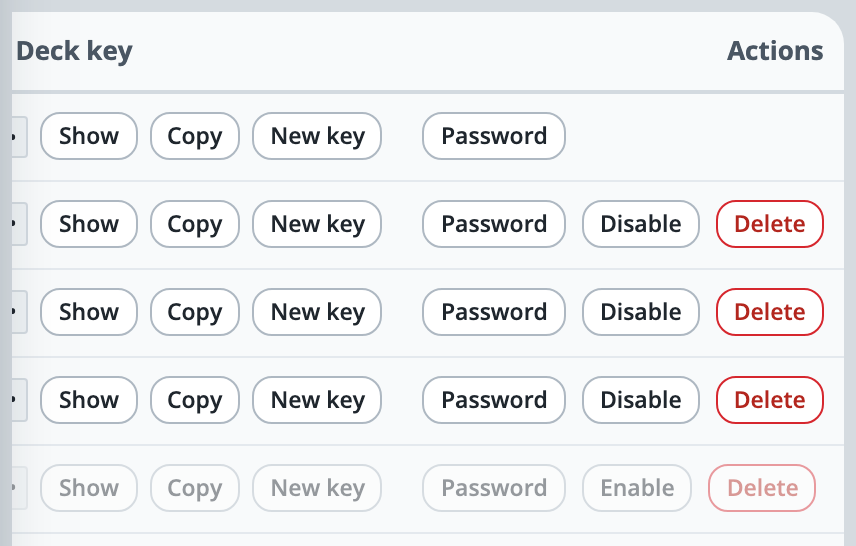
On a free trial, disabling someone frees one of your 10 places, which makes room for someone new. Enable takes the place back, and is refused if all 10 are in use.
To remove someone for good, press Delete and confirm. Their sign-in, lines and settings are deleted, and they are taken off air.
To take someone off air just for now, without stopping their sign-in, open Live and press remove beside them. They can join again.
If it doesn’t work
There is no Disable or Delete beside a name
None is offered beside your own name, because you cannot disable or delete yourself: another admin can do it for you. None is offered beside the owner either, which is your company’s own account and cannot be removed from the server.
Enable is refused: “This site’s licence covers 10 users”
All your places are in use. Disable or delete someone else first, or write to support@oncommstalkback.com for more.
The person you disabled sees “wrong username or password”
That is expected: a disabled account cannot sign in, and the message does not say why. Press Enable to let them in again.
You deleted someone by mistake
Add them again and give them their lines. If you saved a file before, restoring it with Merge brings them back with their lines and the password they had.
Stuck on a step?
Write to support@oncommstalkback.com with the page you are on and what your screen says. Or book a walkthrough, and we will go through it with you.