Low-Latency Talkback for remote crews
Partylines, push-to-talk and camera tally on your phone, computer and watch — hosted for you at your own address, or on your own Mac or Windows PC.
7 days, no card. Plans from £19 a month.
Crew? Download the client.
Hold a key to talk
Hold a key to talk, or double-tap to lock it open. On a keyboard, hold 1, 2, 3 or 4.
Any browseris a client — nothing to install
Mac or WindowsOn Prem Server on your own network
ATEM · VMIX · TSL UMDcamera tally, built in as standard
AES-256-GCMaudio encrypted, and every panel says how
Two ways to run it
The same talkback either way. Choose by where your crew are: out on the internet, or on a network you look after.
ON Comms Cloud
For events and remote crews
yourname.
- No firewall to touch. Everyone connects out to your site, from any network: a truck on somebody else’s internet, a hotel, 4G.
- Crew anywhere in the world. Camera operators, commentators and producers at different venues, or at home.
- Nothing to look after. We run the server and back it up every night.
- Tally and desk audio through two small apps on a computer at the venue: ON Comms Tally for the vision mixer, ON Comms Bridge for the sound desk or Dante.
From £19 a month, or a pass for one event. See the prices
ON Comms Server
For permanent installs
192.
- No internet needed. Phones on the venue Wi-Fi and computers on the wired network connect straight to it.
- The shortest path. The audio stays on your network, with no trip out to the internet and back.
- Nothing else to install. It reads the ATEM, vMix or TSL tally and carries the desk audio itself.
- Your audio never leaves the building, unless you open the port for crew outside it.
From £190 a year, on one Mac or Windows PC. See the prices
The same in both: the talk panel and apps, partylines, private calls, Stream Deck keys, AES-256-GCM, and Admin in a browser. How the two compare
Which show is yours?
Five kinds of production, each with a page: what goes wrong there, and what ON Comms does about it.
Partylines
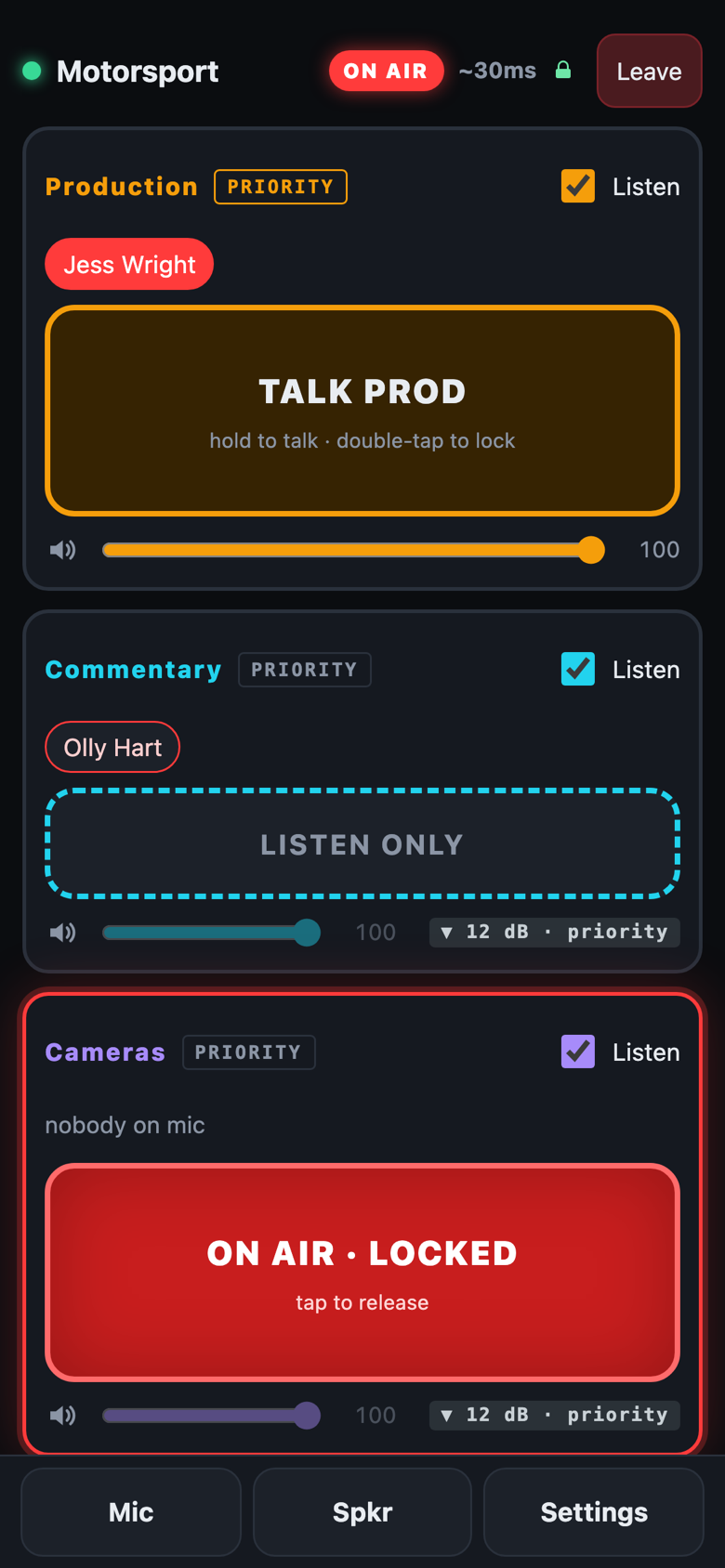
Built like a talkback unit, as many channels as the show needs — each with its own colour and label. Everyone hears the lines you give them, at their own level.
- Talk, listen or nothing, per person and per line, changed live — nobody rejoins.
- Priority lines: while someone talks on one, every other line drops by 6, 12 or 20 dB, or goes silent — and each person can choose their own.
- Private calls to one person, with reply keys that flash until they are answered.
- Key banks each person arranges for their own screen.
Low latency, any network
Audio goes straight to the server over UDP on to everyone listening. Every panel shows its own latency, live.
- 4G, 5G or Wi-Fi, and moving between them picks up the same session rather than rejoining.
- A lost connection comes back by itself, engineered to reconnect at the fastest possible rate.
- Strict networks reach the cloud through a relay, firewall in the way? We got it!
Every device
Crew use what they carry. Directors use what is on the desk.
- iPhone, with a push-to-talk key on the Apple Watch, from the App Store.
- Android.
- Client for Mac and Windows: the talk panel on your device.
- Any web browser, with nothing to install.
- Stream Deck, or any Bitfocus Companion button, for push-to-talk.
Camera Tally
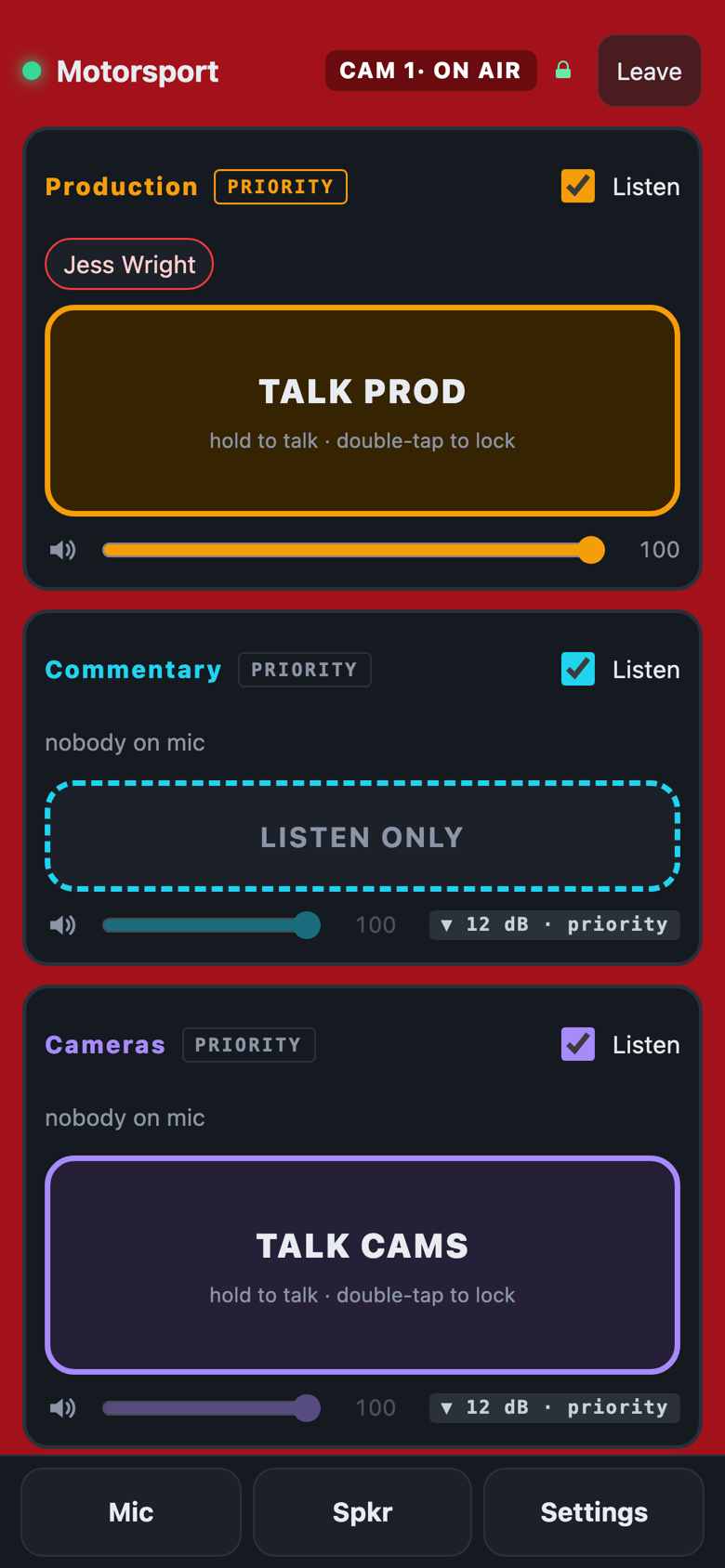
The whole screen goes red when the camera is on air, and green on preview — on the phone, and on the wrist.
- Blackmagic ATEM and vMix.
- TSL UMD 3.1, 4.0 and 5.0 — from TallyMan or the vision mixer, as a truck already sends it.
- Each operator’s camera set in Admin, or chosen by the operator.
- For a cloud server, the ON Comms Tally app at the venue passes it on.
Desks, Dante and programme feeds
Any partyline with real audio: a sound desk, a Dante network, a programme feed.
- Choose the device, then a pair or a channel, each way, with its own gain.
- Core Audio on a Mac, WASAPI on Windows — Dante Virtual Soundcard is one more device.
- Using the cloud? Not a problem! ON Comms Bridge app at the venue.
Run it from a browser
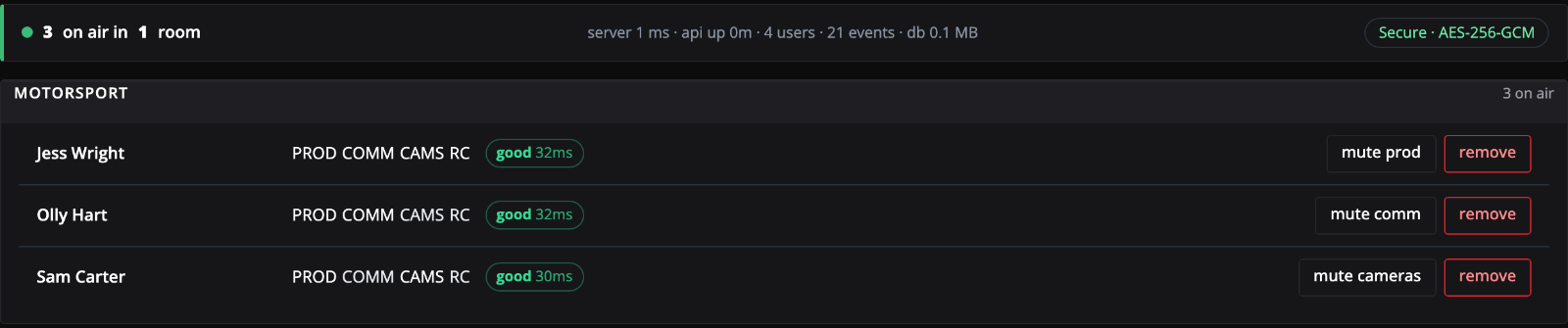
Admin from anywhere: who is on air, and how good their link is, at a glance.
- Everyone’s lines in one grid, applied the moment you change them.
- Mute someone’s line, or take them off air, from the same page.
- An events log: who joined, who dropped, who changed what.
- Save the whole setup to a file sealed with a passphrase, and restore it anywhere.
Time to get talking.
Start a free trial for your company — lets get your crew talking.